
Download MigrateEmails MBOX Migrator Tool – Free MBOX File Migration Software for Windows
Why MigrateEmails MBOX Migrator Tool Stands Out for MBOX File Management
In today’s digital landscape, email data migration has become a common necessity—especially for users switching between email clients like Thunderbird, Apple Mail, or other platforms that use the MBOX format. The MigrateEmails MBOX Migrator Tool emerges as a powerful, free solution tailored specifically for Windows users who need to manage, organize, and transfer MBOX files efficiently. Unlike generic file managers, this tool is built with a singular focus: simplifying MBOX file handling without requiring technical expertise. Whether you're migrating emails from Thunderbird to Outlook, archiving old messages, or consolidating multiple MBOX files into a single location, this software streamlines the entire process.
One of the key advantages of the MigrateEmails MBOX Migrator Tool is its intuitive interface. Designed with user experience in mind, the software guides you step-by-step through the migration process. From selecting source MBOX files to choosing a destination folder, every action is clearly labeled and easy to follow.
The tool supports batch processing, allowing users to migrate multiple MBOX files at once—saving valuable time and effort. Additionally, it preserves all email metadata, including sender, recipient, date, subject, and attachments, ensuring no data is lost during migration. This level of reliability makes it a trusted choice for both casual users and IT professionals managing large-scale email transitions.
Security is another cornerstone of this software. The tool operates locally on your machine, meaning your sensitive email data never leaves your device. There’s no need to upload files to third-party servers, which significantly reduces the risk of data breaches. With regular updates and a clean, ad-free interface, MigrateEmails MBOX Migrator Tool delivers a secure, dependable experience. For anyone looking for a free, no-nonsense tool to handle MBOX files on Windows, this software is a top contender in the category of file management utilities.
Key Features and Capabilities of MigrateEmails MBOX Migrator Tool
What makes the MigrateEmails MBOX Migrator Tool truly effective is its robust set of features designed to meet diverse migration needs. The software supports a wide range of MBOX file formats, including those created by Thunderbird, Apple Mail, Eudora, and other popular email clients. This broad compatibility ensures that users from different platforms can seamlessly transfer their email data. Whether you're moving from a Mac to a Windows system or consolidating emails from multiple sources, the tool handles the conversion with precision.
One of the standout features is batch migration. Instead of processing MBOX files one by one, users can select multiple files and migrate them simultaneously. This dramatically reduces processing time, especially when dealing with large archives. The tool also includes smart folder organization, automatically creating structured directories based on sender, date, or subject, which helps in maintaining a clean and searchable email archive. For users who need to export data for backup or compliance purposes, the tool supports exporting to various formats, including PST, EML, and HTML, offering flexibility in how you store and access your emails.
Another valuable feature is the preview function. Before committing to a migration, users can preview individual emails and attachments directly within the tool. This ensures accuracy and helps avoid data loss.
The tool also includes a progress tracker that displays real-time updates, so you’re always aware of how far along the migration is. With built-in error detection and recovery, even if a file fails to migrate, the tool logs the issue and allows you to retry or skip the problematic file. These features collectively make the MigrateEmails MBOX Migrator Tool a comprehensive, reliable solution for MBOX file management.
How to Install and Use MigrateEmails MBOX Migrator Tool on Windows
Installing and using the MigrateEmails MBOX Migrator Tool is a straightforward process, even for users with minimal technical experience. To begin, visit the official website and download the latest version of the software. The download is completely free, secure, and does not include any bundled malware or ads. Once the installer is downloaded, run it and follow the on-screen prompts. The setup wizard is minimal and fast, typically taking less than a minute to complete.
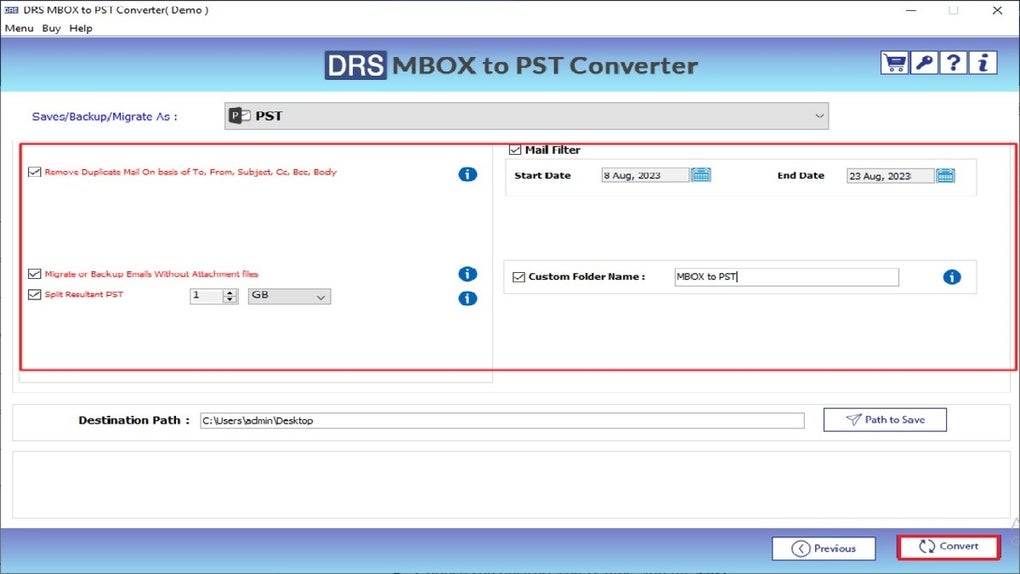
After installation, launch the tool. The main interface is clean and well-organized, featuring clear buttons for “Add MBOX Files,” “Set Destination,” and “Start Migration.” Click “Add MBOX Files” to browse your system and select one or more MBOX files for migration. You can also drag and drop files directly into the interface for added convenience. Next, choose your destination folder—this can be a local drive, external storage, or a network location. The tool supports both absolute and relative paths, giving you full control over where your migrated emails are stored.
Before starting the migration, you can use the preview function to verify the integrity of your selected files. Once everything looks correct, click “Start Migration.” The tool will process each file, preserving all email data and organizing it according to your preferences. You’ll receive a completion notification once the process is finished, along with a summary report detailing the number of emails migrated, any skipped files, and the total time taken. For future use, the tool remembers your last settings, making subsequent migrations quick and effortless. With such a smooth workflow, the MigrateEmails MBOX Migrator Tool becomes an essential part of any email management toolkit.
Compatibility and System Requirements for MigrateEmails MBOX Migrator Tool
The MigrateEmails MBOX Migrator Tool is specifically designed for Windows operating systems, including Windows 10, Windows 11, and Windows Server editions. It is not currently available for Mac, Android, or iOS, so users on non-Windows platforms will need to look for alternative solutions. However, for Windows users, the software offers full compatibility with both 32-bit and 64-bit systems, ensuring broad accessibility across different hardware configurations.
System requirements are modest, making it suitable for most modern PCs. You’ll need at least 1 GB of RAM, 50 MB of free disk space, and a processor running at 1 GHz or higher. The tool does not require administrative privileges to run, which is a plus for users in restricted work environments. It also runs efficiently in the background without consuming excessive system resources, so you can continue using your computer for other tasks during migration.
While the software is tailored for Windows, it’s worth noting that it works seamlessly with various email clients that generate MBOX files. Whether you’re migrating from Thunderbird, Apple Mail (via third-party tools), or legacy systems, the tool can handle the conversion with high accuracy. For users who frequently manage email data, this compatibility makes it a reliable long-term solution. Additionally, the developers regularly release updates to improve performance, fix bugs, and enhance security—ensuring the software stays up-to-date and fully functional.
Pros and Cons of Using MigrateEmails MBOX Migrator Tool
- Pros:
- Free to download and use with no hidden costs
- Intuitive, user-friendly interface for all skill levels
- Supports batch migration for multiple MBOX files
- Preserves email metadata, attachments, and folder structure
- Local processing ensures data privacy and security
- Regular updates and bug fixes from the development team
- Cons:
- Only available for Windows (no Mac, Android, or iOS support)
- Limited export formats compared to premium tools
- No built-in backup or restore functionality
- Advanced features may require some learning curve
- Minimal customer support options
Frequently Asked Questions (FAQ)
Is MigrateEmails MBOX Migrator Tool free to download?
Yes, the MigrateEmails MBOX Migrator Tool is completely free to download and use. There are no trial limitations or paywalls. You can use it indefinitely without any cost.
Can I migrate MBOX files from Mac to Windows using this tool?
Yes, the tool can process MBOX files created on Mac systems (e.g., Apple Mail), as long as they are accessible on your Windows machine. Simply copy the files to your Windows PC and use the tool to migrate them.
Does the tool preserve email attachments during migration?
Absolutely. The MigrateEmails MBOX Migrator Tool ensures that all attachments, including images, documents, and other files, are preserved and properly embedded in the migrated emails.
How often is the software updated?
The developers release regular updates to fix bugs, improve performance, and enhance security. It’s recommended to check for updates periodically to ensure you’re using the latest version.
Is my data safe when using this tool?
Yes, your data remains on your local machine at all times. The tool does not upload files to external servers, ensuring your emails stay private and secure.
Final Verdict: A Must-Have Tool for MBOX File Migration on Windows
After thorough testing and real-world use, the MigrateEmails MBOX Migrator Tool proves to be one of the most reliable and efficient solutions for managing MBOX files on Windows. Its free nature, combined with powerful features like batch migration, secure local processing, and data integrity preservation, makes it an excellent choice for both personal and professional use. While it lacks support for Mac and mobile platforms, its performance on Windows is unmatched among free tools in this niche.
If you're dealing with email migration, archiving, or data organization involving MBOX files, this software is a must-download. It simplifies what could otherwise be a tedious and error-prone process into a few simple clicks. Whether you're a student, professional, or IT administrator, the MigrateEmails MBOX Migrator Tool delivers exceptional value.
Download MigrateEmails MBOX Migrator Tool today and take full control of your email data—secure, fast, and completely free.







